Purpose
This node allows to redefine the Name Convention that needs to be used in order to interpret the file names of the input files, including any tokens that you want to extract from the incoming filenames.
The main purpose is to be used in situations where previous nodes did not provide the desired name convention, or if the filenames were not trivial to interpret by using the default Name Convention.
The name convention to be used can be typed or selected in the Name Convention property (otherwise it will use the default name convention of the workflow).
NOTE: The Name Convention defined in this node is only used to interpret the input filenames, it can not be used to "translate" between different name conventions by itself, and it is not enough for changing the names to be used in the creation of new files downstream. If that is what you want then you could use the extracted tokens in the Name Convention property of the encoder nodes creating those files, or for more clarity and extra functionality by using the technique explained in the next example.
Usage example:
Let's suppose we have this workflow:
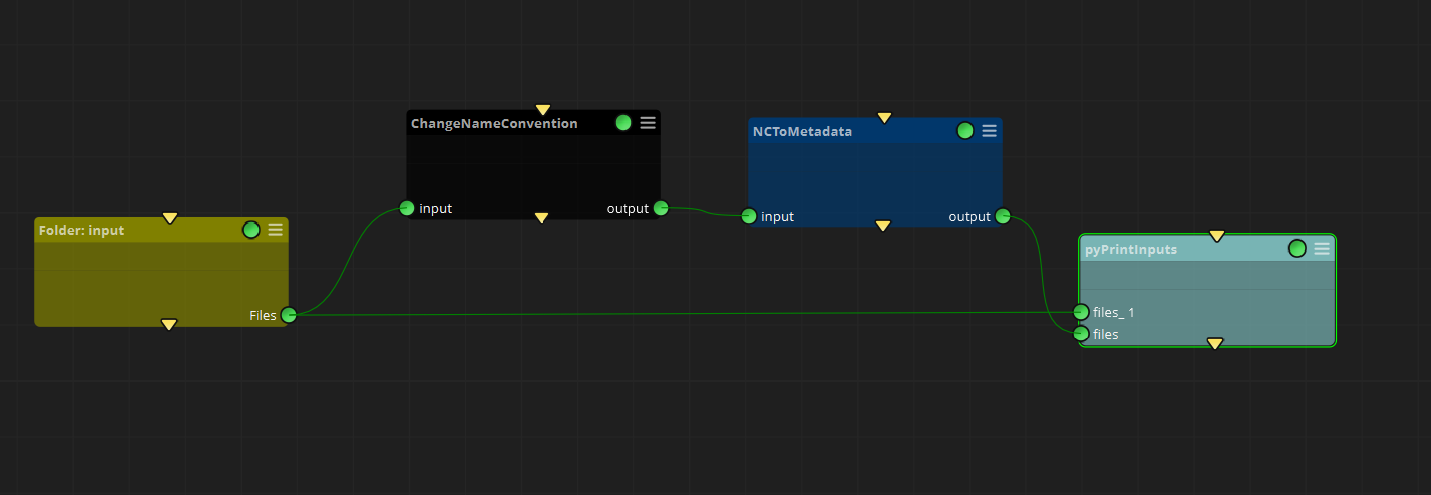
And let's suppose that the Folder node contains this file:
SGO_101_020_0010.mov
The initial Folder node is using the default Name Convention for the workflow ([path][baseName][.ext] ). But now we will change it in the change Name Convention node, by setting this value in the Name Convention property:
[path][sgProject]_[sgSequence]_[sgShot]_[sgVersion][.ext]
Then when that node is connected to a NC To Metadata node, it will create new metadata tokens based on the Name Convention that we have just defined, which we can use in other nodes downstream. In this example we will connect it to a pyPrintInputs node, and when we execute the workflow we will see that the connector "files" has received new metadata tokens ([sgProject], [sgSequence],[sgShot], [sgVersion]) that were not provided by the initial node (files_1 connector):
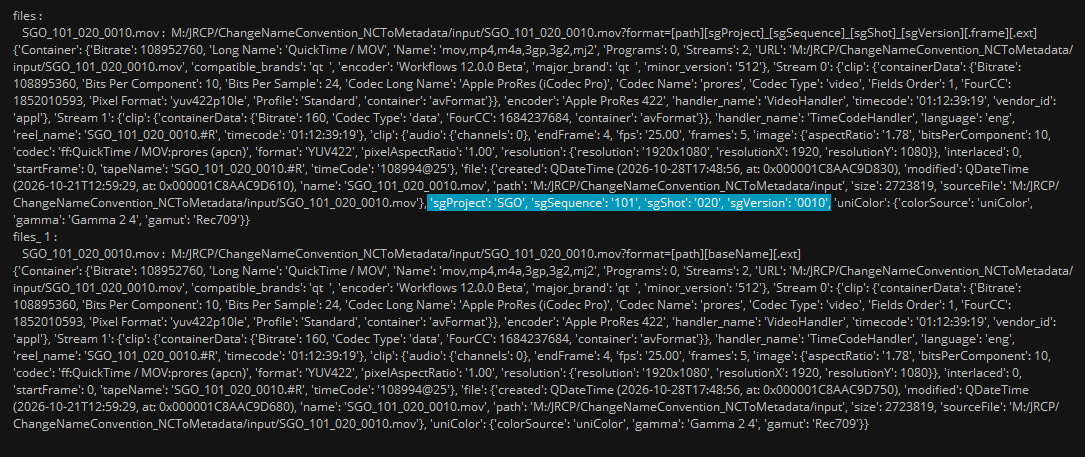
Now you could use those metadata tokens in any other node downstream, either for the filenames of new media files or for any other metadata purposes.
Inputs
input: Any files
Outputs
Output: The input media files, with their name convention set.
Standard properties
Object Name
Color
Bypass
Lock
Node specific properties
Name Convention: The new name convention used to interpret incoming file paths, including any tokens that you want to extract from the incoming filenames. You can use the "..." icon to select it in the Name Convention Manager
Developer reference (Python - ChangeNameConvention.[Property ID], API Rest - node/ChangeNameConvention/property/[Property ID])
Property Label |
Property ID |