The file menu contains the following features:
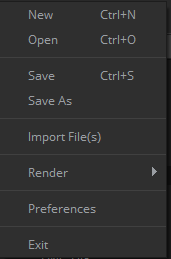
- New: it will create a new Mistika Workflows project ( .mwf file). A workflow project can contain any number of workflows at the same time, each one in its own tab of the Nodegraph.
- Open: Open a Mistika Workflows project ( .mwf file)
- Import Worflow: Same as Open, but the imported workflows will be added to new tabs rather than starting from a clean situation.
- Save, Save as. Save a Mistika Workflows project. All the current workflows (all the workflow tabs) are saved in a same .mwf file.
- Save as Template. Save the workflow as a template under the shared/workflowsTemplates folder.
- Save as Runner. Save the workflow as a template under the shared/workflowsRunner folder (thus making it available to the Mistika Runner product).
- Import files: it will open a file browser to load files into the Nodegraph (media files or any other files ), also creating the place holder input nodes for them. Alternatively you can also use an external browser to drag & drop files into the Nodegraph.
- Render: it will give you access the buttons "Add to queue" and "Add all ready to queue", which start workflow processing and are also present in the interface.
- Preferences: it will open the preferences panel. Explained in detail in the next chapter.