Purpose
This node detects automatically any new external disk plugged into the system, gets its mount point, and triggers the workflow outputting the contained files trough the Files connector (i.e., acting as a Folder node internally). Optionally it can also umount the drive when the workflow is finished, so that it can be safely removed.
Once you have your workflow configured and added to the queue, the node will already be listening for new connected disks. This node does not block the Queue panel while waiting for new files, it just waits silently, and the workflow containing is executed every time new files are detected.
In the case the workflow is manually cancelled, it will not eject the disk. Therefore a manual eject would be required.
If several partitions are found in the disk, it will mount one of them, trigger the workflow and, when finished, it will unmount that partition and repeat the cycle with the next one, until all partitions found are processed.
The node has an Info output connector, that serves to capture the status of the recognized disk and make use of it in any notification node:

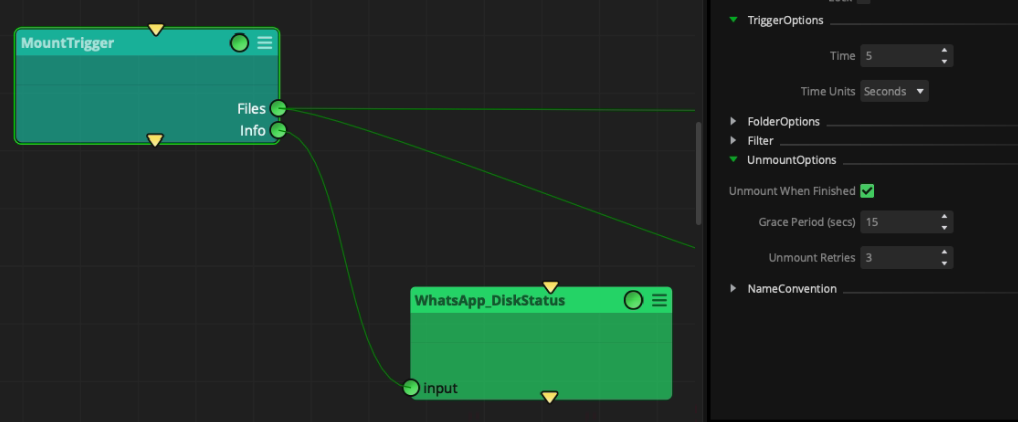
Such status and all related information to the recognized disk can be retrieved with the up.getPrivateData(‘mountTrigger’) method, which outputs something like below:
When mounted:
{'deviceId': '/dev/disk5', 'ejected': False, 'lastEvent': 'Workflow launched', 'lastVolume': '/dev/disk5s1', 'lastVolumeName': 'DISCO_APFS', 'volumes': {'/dev/disk5s1': {'history': ("Disk detected, 'DISCO_APFS' mounted at /Volumes/DISCO_APFS", 'Workflow launched'), 'name': 'DISCO_APFS'}}}
When unmounted:
{'deviceId': '/dev/disk5', 'ejected': True, 'lastEvent': 'Disk ejected', 'lastVolume': '/dev/disk5s1', 'lastVolumeName': 'DISCO_APFS', 'volumes': {'/dev/disk5s1': {'history': ("Disk detected, 'DISCO_APFS' mounted at /Volumes/DISCO_APFS", 'Workflow launched', 'Workflow finished with errors; unmounting the disk', 'Disk ejected'), 'name': 'DISCO_APFS'}}}
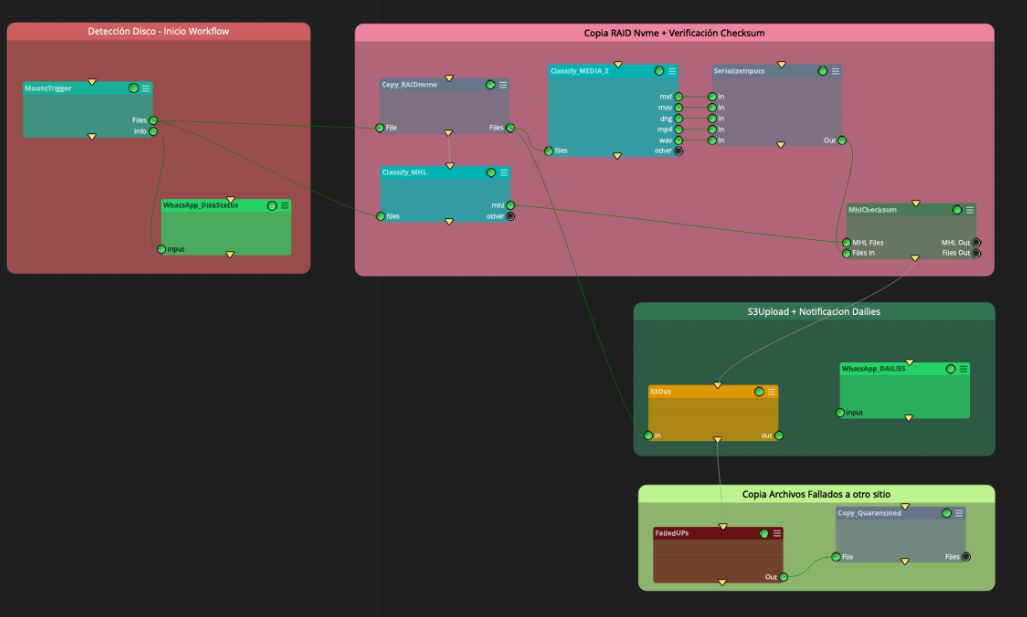
This node is useful for all kinds of ingest workflows, where the disk from the set containing all omf assets can automatically be copied, checksum verified, uploaded, transcoded, or other kind of media processing. All of it triggered by just connecting the disk to the station. Example workflow:
Outputs
Files: files found in the connected disk.
Info: Information about the mounted drive, its mount point, and other details of the workflow execution, as explained above.
Standard properties
Object Name
Color
Bypass
File
Name Convention
Lock
Folder properties
Alphabetical Order
Include Subfolders
Add Root
Path properties
Filter Mode
File Name Only
Node specific properties
Latency: It is
TriggerOptions:
Time: Elapsed time between scans in order to detect a new disk plugged in.
Time Units: Time units (seconds, minutes, hours..)
UnmountOptions:
Unmount When Finished: toggle to determine if the node unmounts the disk after the workflow is finished.
Grace Period: Elapsed time between ‘Unmount Retries’ (in seconds)
Unmount Retries: Number of attempts to unmount the disk
Developer reference (API Rest - node/MountTrigger/property/[Property ID])
Property Label |
Property ID |
Time |
time |
Time Units |
timeUnits |
Include Subfolders |
recursive |
Alphabetical Order |
alphabeticalOrder |
Add Root |
addRoot |
Filter Mode |
filterMode |
File Name Only |
fileNameOnly |
Include |
include |
Exclude |
exclude |
Unmount When Finished |
unmountEnabled |
Grace Period (secs) |
graceSeconds |
Unmount Retries |
unmountRetries |
Maintain Padding |
maintainPadding |