Purpose
This node download EDL files from Workflows Bridge portals. Those are web portals that you can create to attend your clients, who will be able to upload EDL files validating them against your own rules (to make sure no EDL is processed if it has noticeable problems...). Once validated they can be downloaded by this node and passed to other nodes downstream.
Note that this is a "pull" method for downloading files that is only necessary when the default "push" method is not available. For more details there are two ways to do this:
Push method: When a new file is uploaded and validated to a Bridge portal of your account (at www.sgo.es/portals ) the portal will try to send it immediately to your Workflows Creator system (using the REST-API built in capability) to be received by the Received Files node. The Received Files node is a "trigger" node (a node that can trigger a workflow execution automatically), but this is only possible when the Workflows server is not behind a firewall, or if you can open a port in the firewall for this purpose (the local port is user definable in Preferences -> Network Listener ). This method is extremely fast because the new files are sent immediately.
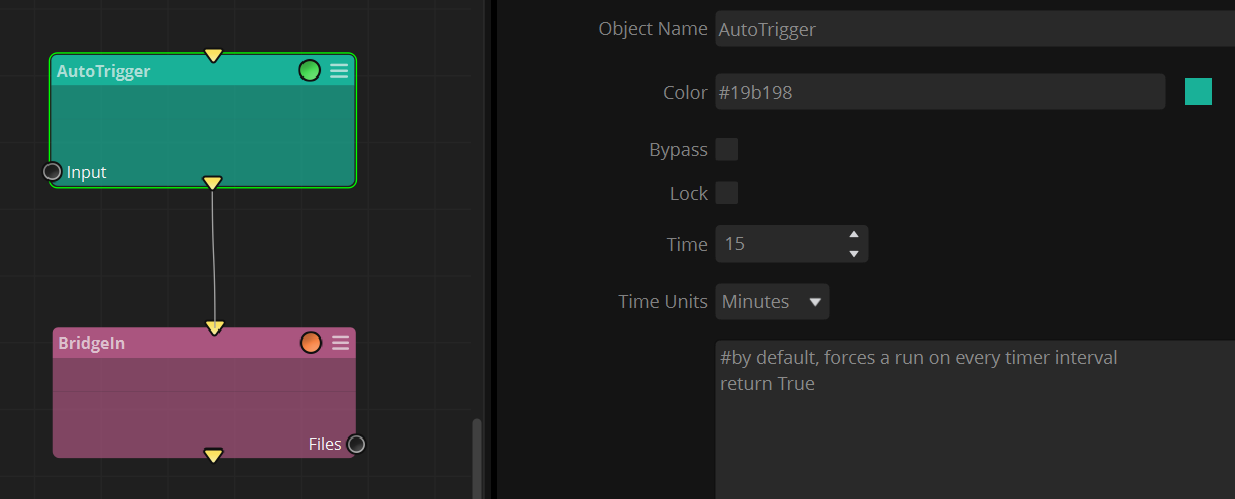
Pull method: When a port in the workflow server can not be made accessible to the Bridge portal then you can use a Bridge In node in combination with an Autotrigger node to check for new files periodically. This method is slower because it requires to wait until the next time trigger (user definable). This snapshot shows a workflow that will check for new downloads every 15 minutes:
Outputs
Files: Downloaded files are sent through this connector.
Standard properties
Object Name
Color
Bypass
Lock
Folder properties
Include
Exclude
Python standard properties
code
This node is written in Python, and the source code is provided for additional flexibility.
Node specific properties
receivedFilesID: A user defined name for the incoming job. It just needs to match the one that is set in your portal. This permits to have different workflows in parallel attending different type of jobs (or different clients).
Local Path: Folder path destination to store donwloaded files. Make sure to end the path with the typical folder slash "/".
Delete after processing: Delete the original files after downloading them (to effectively "move" the files rather than making copies)
CONFIG:
serverURL: The URL of the Bridge API. Typically https://www.sgo.es/api/bridge
accessToken: A user defined password. It just needs to match the one that is configured in the Bridge portal. You can think about it as a kind of password, so that nobody else can download files sent to you.
Developer reference (Python - BridgeIn.[Property ID], API Rest - node/BridgeIn/property/[Property ID])
Property Label |
Property ID |
receivedFilesID |
receivedFilesID |
Local Path |
localPath |
Delete after processing |
deleteAfterProcessing |
filterMode |
filterMode |
fileNameOnly |
fileNameOnly |
Include |
include |
Exclude |
exclude |
serverURL |
serverUrl |
accessToken |
accessToken |