Purpose
This node takes input files from any other node and generates a .csv file with several columns with the desired metadata information contained in those files.
It can also generate a single .csv file per input file.
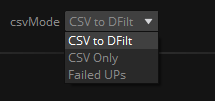
It has three different modes, depending on how the structure of the .csv file should be. The mode can be selected in the pulldown menu 'csvMode':
All modes have in common the following csvOptions:
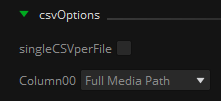
singleCSVperFile: If active, if will create an independent .csv file per incoming file.
Column00:
- FullMediaPath: Option to get the full media input file path in the first column. This option must be selected if the node is planned to feed a CSVtoDFILT node.
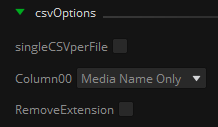
- MediaNameOnly: Option to get only the input file name in the first column. Not suitable for using with the CSVtoDFILT node, but useful if just file information gathering is desired when generating the .csv file. If this option is selected then the toggle RemoveExtension will be available, which allows to also remove the extension from the file name:
csvModes
The 'CSV to DFilt' mode is mainly intended to work together with the CSVtoDFILT node, which will create a burn-in of the metadata to the final output file.
If the Column00 is set to FullMediaPath, the .csv file generated will have the expected structure to be compatible with the CSVtoDFILT node:

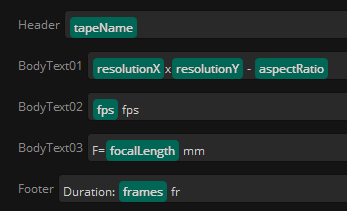
In this mode, the data to be burned in as Header, Footer, and BodyText on the image can be filled in their respective fields with string literals, dynamic tokens metadata, or a combination of both:
The 'CSV Only' mode instead is to be used to generate .csv files gathering information about the input files.
It can be a convenient way to export metadata obtained with Mistika Workflows into a standard format readable and editable by many other applications.
This mode allows to select how many columns will the .csv have, and, in the same way of the previous mode, in each of them we can make use of string literals, tokens, or both:
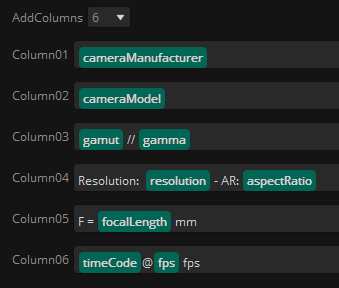
In this mode, the .csv file is fully compatible with the CSVtoUPmdata node.
This can be useful after having scanned some storage folders and gathered all its media files information, as the generated .csv can be used to avoid re-scanning again all folders when feeding another workflows.
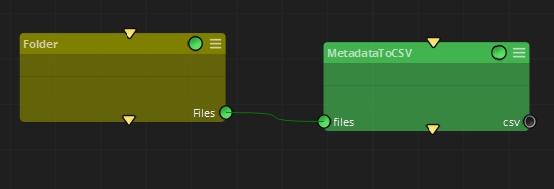
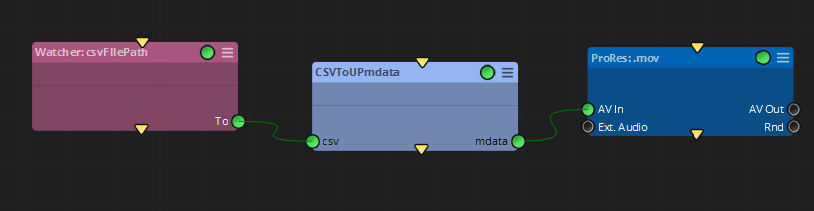
Finally, the 'Failed UPs' mode, is designed to work after a FailedUPs node.
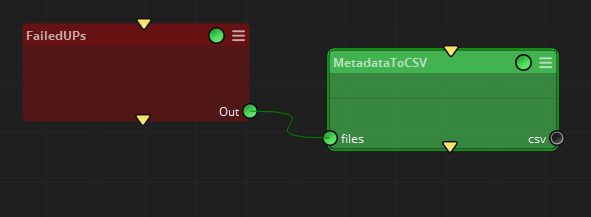
For each input failed UP, it will gather the information of the workflow, node, and kind of error throwed by the FailedUPs node, and fill the required columns with them.
This is a good manner of having a report of failures in the current workflow.
Inputs
files: input files with their associated metadata, given in UP / Universal Paths format, to be converted to .csv format.
Outputs
csv: Path to the .csv file created by this node.
Standard properties
Object Name
Color
Bypass
Lock
Name Convention
Python standard properties
code
NOTE: This is a Python node, with source code provided in this property. An introduction to all the Python tools in Mistika Workflows is available in the Python scripting tools section.
Node specific properties
csvPath: Folder where the .csv file will be stored. The output .csv file name will be always constructed as csvPath/tabName_nodeName.csv
overwrite: If that .csv already exists, this property decides if it can be overwritten.
csvMode: pulldown menu to select the kind of .csv file to be generated and be compatible with other nodes.
csvOptions:
singleCSVperFile: If active, if will create an independent .csv file per incoming file.
FullMediaPath: Option to get the full media input file path in the first column. This option must be checked if the node is planned to feed a CSVtoDFILT node..
MediaNameOnly: Option to get only the input file name in the first column. Not suitable for using with the CSVtoDFILT node, but useful if just file information gathering is desired when generating the .csv file.
RemoveExtension: Do not include the extension of the incoming files.
Header, BodyText01..BodyTextXX, Footer: Fields to be used to fill the columns of each input file. They can be string literal, dynamic tokens, or a mix of both.
AddColumns: Pulldown menu to select how many columns to be added in the generated .csv file. (up to 10 by default)
Column01, Column02.... Column10: Fields to be used to fill the columns of each input file. They can be string literal, dynamic tokens, or a mix of both.
Developer reference (Python - MetadataToCSV.[Property ID], API Rest - node/MetadataToCSV/property/[Property ID])
Property Label |
Property ID |
CSV Path |
csvPath |
Overwrite |
overwrite |
CSV Mode |
csvMode |
Single CSV Per File |
singleCSVperFile |
Column 00 |
Column00 |
Remove Extension |
RemoveExtension |
Header |
Header |
Body Text 01 |
BodyText01 |
Body Text 02 |
BodyText02 |
Body Text 03 |
BodyText03 |
Footer |
Footer |
Add Columns |
AddColumns |
Column 01 |
Column01 |
Column 02 |
Column02 |
Column 03 |
Column03 |
Column 04 |
Column04 |
Column 05 |
Column05 |
Column 06 |
Column06 |
Column 07 |
Column07 |
Column 08 |
Column08 |
Column 09 |
Column09 |
Column 10 |
Column10 |
AddHeaders |
AddHeaders |
HeaderColumn01 |
HeaderColumn01 |
HeaderColumn02 |
HeaderColumn02 |
HeaderColumn03 |
HeaderColumn03 |
HeaderColumn04 |
HeaderColumn04 |
HeaderColumn05 |
HeaderColumn05 |
HeaderColumn06 |
HeaderColumn06 |
HeaderColumn07 |
HeaderColumn07 |
HeaderColumn08 |
HeaderColumn08 |
HeaderColumn09 |
HeaderColumn09 |
HeaderColumn10 |
HeaderColumn10 |
keys |
keys |