The Workflows menu contains the following features:
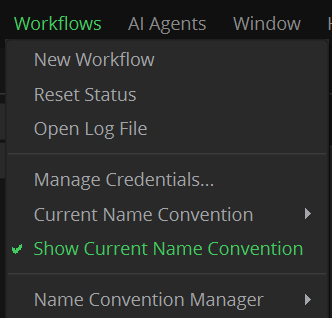
New Workflow: It opens a new empty Nodegraph. You can type a name for it or leave it with the default name. A quick way to do the same action is to click on the plus "+" icon in the upper right side of the Nodegraph. You can also delete a workflow by clicking on the "x" icon.

Workflow Tabs: Each tab contains an independent workflow, and the workflow tabs can be reordered to your likes by drag & drop actions.
Reset Status: Reset the status of the current workflow (after executing it). Its status and light indicators will forget any error state, as if the workflow had not been executed yet. (this function is barely used by normal users, as it is intended for programmers when using python scripts interrogating the workflow status).
Open log file: It will open the render log of the current day. (for previous logs, daily render logs are stored in the SGO AppData/Workflows/log folder)
Manage Credentials: These menus are explained in its own dedicated chapter its own dedicated chapter about the Workflows Credentials Manager
Name Convention menus: These menus are explained in its own dedicated chapter about Name convention management.